
The search function allows you to find invoices based on various criteria, such as vendor, invoice number, amount, or invoice date.
Click  in the left hand menu.
Enter search criteria
Start by selecting the company or companies you want to search in. Then enter one or more search criteria to narrow down the results. For example, you can search by:
- Invoice number
- Vendor
- Invoice date
- Amount
- Reference or recipient
The more search criteria you enter, the more accurate the results will be.
Search for parts of a word
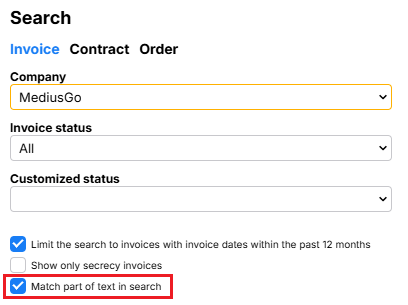
If the “Match part of text in search” option is selected, you can search for part of a word or name and still get results.
Search for older invoices
By default, only invoices with an invoice date from the last 12 months are displayed.
If you want to search for older invoices, uncheck the option “Search only for invoices with an invoice date within the last 12 months.”
View search results
After entering your search criteria, click Search at the bottom of the search column.

The results are displayed as a list of invoices that match the search. At the top of the list, a summary is displayed, including:
- Number of invoices in the results
- Total invoice amount
- VAT amount
Open an invoice
To open an invoice, click on the row in the search results.
If you only want to view the invoice screen, click on  on the relevant row.
Once the invoice is open, you can view all available information about it and browse through the invoices in the search results.
Export the search results
You can export all or part of the search results to Excel or PDF for further processing or archiving.
More about the search function
If you want to learn more about searching for invoices in MediusGo, go to the article Search