
MediusGo Genie Smartflow is activated for all vendors when the function is activated for the company, but can then be configured for each vendor.
To change the settings for a vendor, first open an invoice with the relevant vendor in the work queue window. Among the icons on the right, click to open the form. The form consists of five different settings that are used to activate/deactivate functions for Smartflow.
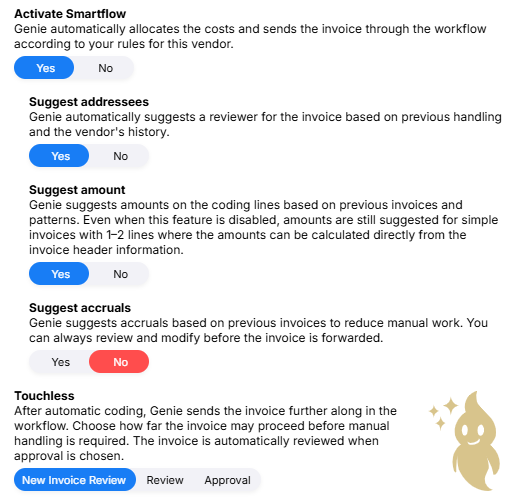
Activate SmartflowThe default setting for this feature is Yes. | |
| Yes | Set this to Yes if you want to automate coding for this vendor. You decide how much you want to automate with the other settings. Read more about how Genie handles coding in the article Genie Smartflow - Coding. |
| No | Invoices from this vendor are coded as before, either manually or via coding suggestions. Addressing and amounts are also handled as before. |
Suggest addresseesThe default setting for this feature is Yes. | |
| Yes | Genie Smartflow suggests the user who previously reviewed the vendor's invoices, regardless of the reference or what the reference register suggests. If flow templates are set up, these will override Genie's addressing suggestions. When Genie suggests a reviewer, this will be marked on the send form, under the heading Choose addressees with three stars. |
| No | The invoices are coded by Genie, but you choose who should receive the invoice in the next step, either manually or via flow templates. |
Suggest amountThe default setting for this feature is Yes. | |
| Yes | Genie suggests an amount for the coding row based on the distribution of previous invoices. |
| No | The invoices are coded by Genie, but you add the amounts to the coding rows yourself. Amounts can be suggested for simpler invoices with 1–2 lines where the amounts can be calculated directly from the invoice's main information. |
Suggest accrualsThe default setting for this feature is No. | |
| Yes | Genie bases the accrual proposal on the most similar previously processed invoice, including the date range and account it was accrued to, as well as how the start and end dates relate to the invoice date. |
| No | The invoices are coded by Genie, but you add any accruals to the coding rows yourself. |

Touchless
Select how far into the flow coded invoices should be sent. Read more in the article Genie Smartflow - Touchless.
Change settings
Changes can be made to a vendor when there is an active invoice from that vendor in the flow. The icon  is displayed on invoices opened from the Work Queue window, not on searched invoices.
When changes are made to a vendor, they will be applied to the next invoice that comes in. If you want the changes to be applied to an existing invoice, the invoice must be restarted.